
-
×
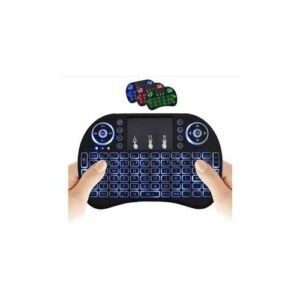 Wireless Mini Keyboard
1 × KSh 1,000.00
Wireless Mini Keyboard
1 × KSh 1,000.00
Subtotal: KSh 1,000.00


Capacity: 4GB Single Module
🔹 Type: DDR4 SDRAM
🔹 Speed: 2400MHz (PC4-19200)
🔹 Voltage: 1.2V
🔹 CAS Latency: CL17
🔹 Form Factor: 288-pin DIMM (Desktop) / 260-pin SODIMM (Laptop)
🔹 Error Checking: Non-ECC
KSh 2,000.00
Is your computer struggling to keep up with daily tasks? Do you experience frustrating slowdowns when opening multiple programs? The solution might be simpler than you think.
The Lexar DDR4 4GB RAM module at Elvatech is designed to enhance your system’s speed and efficiency, making everyday computing smoother and more enjoyable. Whether you’re a student, office worker, or casual user, this RAM upgrade can breathe new life into your PC or laptop.
In this comprehensive guide, we’ll explore:
✔ The benefits of upgrading your RAM
✔ Key features of Lexar DDR4 memory
✔ Compatible devices and installation tips
✔ Performance improvements you can expect
✔ Answers to common upgrade questions
Reduce application load times by up to 30%
Smoother multitasking between browser tabs and office software
Most cost-effective way to improve an aging system
Extends the useful life of your current device
1.2V low voltage reduces power consumption
Generates less heat than older DDR3 modules
Works instantly with compatible motherboards
No software configuration required
Rigorously tested for stability and reliability
Built with high-grade components for long-term performance
This RAM upgrade works with:
✅ Intel 100/200/300-series motherboards
✅ AMD Ryzen platforms
✅ Most DDR4-compatible laptops
✅ Mini-PCs and NUC systems
Note: Always verify compatibility with your specific model before purchasing.
Power down and unplug your computer
Ground yourself to prevent static discharge
Desktop: Typically near CPU socket
Laptop: Usually under a service panel
Align notch with slot key
Press firmly until clips snap into place
Reassemble and power on
Check System Information to confirm recognition
| Scenario | Before (4GB Total) | After (8GB Total) |
|---|---|---|
| Web Browsing | 5-10 tabs max | 15-20 tabs smoothly |
| Office Work | Occasional freezing | Fluid document switching |
| Photo Editing | Slow rendering | Basic edits manageable |
| System Boot | 45-60 seconds | 20-30 seconds |
No – DDR4 is not backward compatible with DDR3 slots
Possible but not ideal – For best results, use matching modules
Typical gains include:
Faster application launches
Reduced system freezing
Better multitasking capability
Basic gaming only – Modern games recommend 8GB+
Yes – Professional installation available at select locations
Try:
Reseating the module
Testing each slot individually
Updating BIOS
DIMM = Desktop | SODIMM = Laptop/Mini-PC
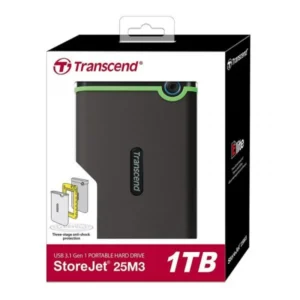
Storage Capacity: 1TB
Interface: USB 3.1 Gen 1 (backward compatible with USB 2.0)
Transfer Speed: Up to 5Gbps
Shock Resistance: Yes (Three-stage anti-shock system)
Compatibility: Windows, macOS, Linux
Casing: Rugged silicone outer shell
Software: Transcend Elite (backup and restore)
Dimensions: Approx. 129.5mm x 82.4mm x 16.1mm
Weight: ~185g
Warranty: 3 years (model-dependent)
Slim, lightweight design – ideal for travel
Soft padded interior to prevent scratches and bumps
Durable outer shell – splash and dust resistant
High-quality zipper for smooth, secure closure
Fits snugly into backpacks, totes, and briefcases
Available sizes: 13″, 14″, 15.6″, and 17″
Material options: Neoprene / Polyester / Nylon
Colors: Black, Grey, Navy, Pink (availability varies)
Compatible with laptops, MacBooks, ultrabooks
specs
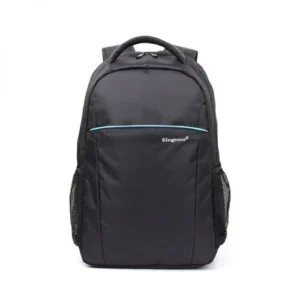
Capacity: 20-30L (expandable)
🔹 Laptop Compartment: Fits up to 15.6″ laptops
🔹 Material: Water-resistant polyester/nylon
🔹 Zippers: YKK (high-quality)
🔹 Special Features:
USB charging port
TSA-friendly luggage strap
Hidden anti-theft pocket
🔹 Dimensions: 18 x 12 x 8 inches (approx.)
🔹 Weight: 2.2 lbs (lightweight yet sturdy)
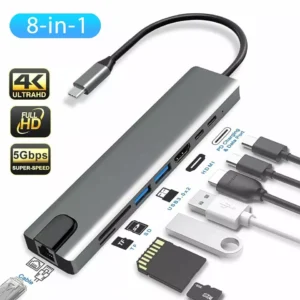
| Feature | Specification |
|---|---|
| Input | USB Type-C Male |
| HDMI Output | 1x 4K @ 30Hz HDMI Port |
| USB 3.0 Ports | 3x USB-A 3.0 (up to 5Gbps) |
| Card Readers | 1x SD + 1x MicroSD/TF (simultaneous access) |
| Ethernet Port | 1x RJ45 Gigabit LAN (10/100/1000 Mbps) |
| PD Charging Port | 1x USB-C Power Delivery (up to 100W) |
| Material | Aluminum Alloy Casing |
| Compatibility | macOS, Windows, Android, Linux, iPadOS |
| Cable Length | Approx. 15cm short cable (tangle-free) |
| Color | Space Grey / Silver / Black |
Select at least 2 products
to compare


There are no reviews yet.