
-
×
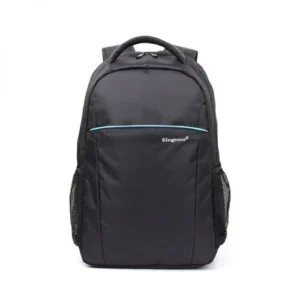 King Travel Laptop Backpack
1 × KSh 4,800.00
King Travel Laptop Backpack
1 × KSh 4,800.00
Subtotal: KSh 4,800.00


Capacity: 4GB Single Module
🔹 Type: DDR4 SDRAM
🔹 Speed: 2400MHz (PC4-19200)
🔹 Voltage: 1.2V
🔹 CAS Latency: CL17
🔹 Form Factor: 288-pin DIMM (Desktop) / 260-pin SODIMM (Laptop)
🔹 Error Checking: Non-ECC
KSh 2,000.00
Is your computer struggling to keep up with daily tasks? Do you experience frustrating slowdowns when opening multiple programs? The solution might be simpler than you think.
The Lexar DDR4 4GB RAM module at Elvatech is designed to enhance your system’s speed and efficiency, making everyday computing smoother and more enjoyable. Whether you’re a student, office worker, or casual user, this RAM upgrade can breathe new life into your PC or laptop.
In this comprehensive guide, we’ll explore:
✔ The benefits of upgrading your RAM
✔ Key features of Lexar DDR4 memory
✔ Compatible devices and installation tips
✔ Performance improvements you can expect
✔ Answers to common upgrade questions
Reduce application load times by up to 30%
Smoother multitasking between browser tabs and office software
Most cost-effective way to improve an aging system
Extends the useful life of your current device
1.2V low voltage reduces power consumption
Generates less heat than older DDR3 modules
Works instantly with compatible motherboards
No software configuration required
Rigorously tested for stability and reliability
Built with high-grade components for long-term performance
This RAM upgrade works with:
✅ Intel 100/200/300-series motherboards
✅ AMD Ryzen platforms
✅ Most DDR4-compatible laptops
✅ Mini-PCs and NUC systems
Note: Always verify compatibility with your specific model before purchasing.
Power down and unplug your computer
Ground yourself to prevent static discharge
Desktop: Typically near CPU socket
Laptop: Usually under a service panel
Align notch with slot key
Press firmly until clips snap into place
Reassemble and power on
Check System Information to confirm recognition
| Scenario | Before (4GB Total) | After (8GB Total) |
|---|---|---|
| Web Browsing | 5-10 tabs max | 15-20 tabs smoothly |
| Office Work | Occasional freezing | Fluid document switching |
| Photo Editing | Slow rendering | Basic edits manageable |
| System Boot | 45-60 seconds | 20-30 seconds |
No – DDR4 is not backward compatible with DDR3 slots
Possible but not ideal – For best results, use matching modules
Typical gains include:
Faster application launches
Reduced system freezing
Better multitasking capability
Basic gaming only – Modern games recommend 8GB+
Yes – Professional installation available at select locations
Try:
Reseating the module
Testing each slot individually
Updating BIOS
DIMM = Desktop | SODIMM = Laptop/Mini-PC
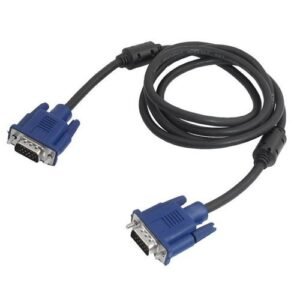
| Feature | Details |
|---|---|
| Cable Length | 2 Meters |
| Connector Type | VGA Male to VGA Male (15-pin) |
| Resolution Support | Up to 1080p (Full HD) |
| Cable Shielding | Double-foil & braid shielding |
| Outer Material | PVC jacket for durability |
| Signal Type | Analog video |
| Compatibility | PCs, Laptops, Projectors, Monitors |
| Locking Mechanism | Screw-in male connectors |
peaker Configuration: 2.0 stereo channel
Power Supply: USB-powered (5V)
Audio Input: 3.5mm audio jack
Output Power: Approx. 6W RMS (3W x 2)
Frequency Response: 90Hz – 20KHz
Control: Volume knob + power switch
Compatibility: Laptop, desktop, monitor, TV, phones
Design: Slim bar-type or dual satellite speaker (model dependent)
Lighting (Optional): RGB/LED ambient lighting
Cable Length: Standard 1.2m+ for flexible placement
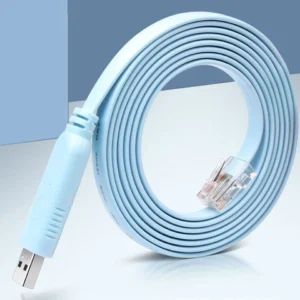
| Feature | Details |
|---|---|
| Connector A | RJ45 Male (8P8C) |
| Connector B | DB9 Female (RS232) |
| Compatibility | Cisco, Juniper, TP-Link, MikroTik, Ubiquiti |
| Cable Length | 1.5m–2m (varies by model) |
| Cable Color | Blue (Cisco standard) or Black |
| Build Material | Flexible PVC with molded connectors |
| Pin Mapping | Cisco-compatible wiring standard |
| Speed Support | 9600 bps to 115200 bps (RS232 baud rates) |
| Usage | Console configuration, CLI access |
Select at least 2 products
to compare


There are no reviews yet.