
-
×
 Q07 Handy Selfie Stick 3-in-1 Bluetooth Wireless Tripod
1 × KSh 1,000.00
Q07 Handy Selfie Stick 3-in-1 Bluetooth Wireless Tripod
1 × KSh 1,000.00 -
×
 Electronic Money Detector
1 × KSh 1,500.00
Electronic Money Detector
1 × KSh 1,500.00
Subtotal: KSh 2,500.00
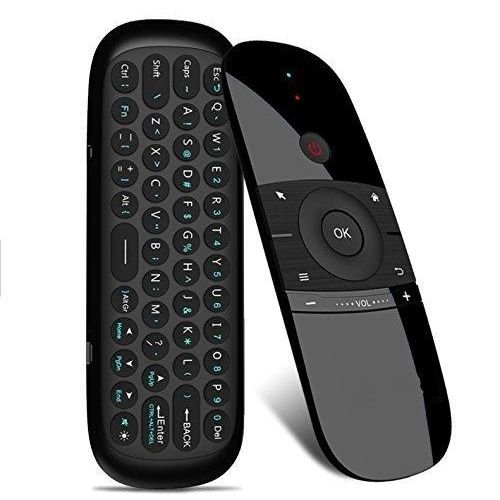
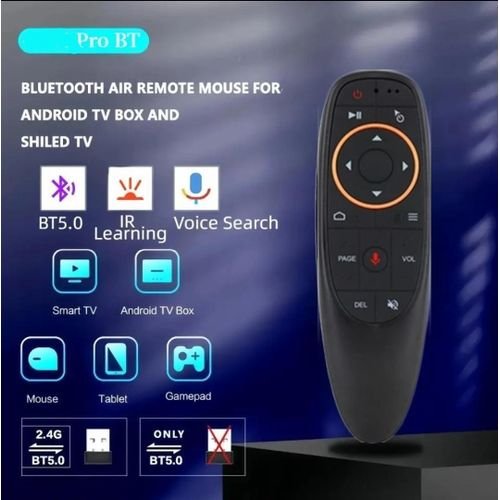
specs
Connection: 2.4GHz Wireless
Control Range: Up to 10m
Mic: Built-in for voice search
Power: Rechargeable via Micro USB
OS Support: Android, Windows, Mac OS, Linux
Interface: USB 2.0 dongle
Motion Sensor: 6-axis gyroscope
Keyboard: Optional (for some models)
Dimensions: Compact, ergonomic build
KSh 2,000.00
In a world full of smart devices, from Android TVs and projectors to PCs and streaming boxes, convenience, speed, and simplicity are not just luxuries—they’re essentials. At Elvatech, we introduce the Voice Air Remote Mouse, a revolutionary device that combines the functionality of a remote, mouse, keyboard, and voice assistant all in one compact, intuitive tool.
Whether you’re binge-watching your favorite Netflix series, navigating a presentation, or enjoying hands-free browsing, the Voice Air Remote Mouse gives you effortless control over your digital experience.Why the Voice Air Remote Mouse is a Game-Changer
At first glance, it looks like a simple remote. But this compact controller is a 4-in-1 powerhouse:
Air Mouse: Wave your hand to move the cursor on screen.
Remote Control: Standard buttons for power, volume, playback, and navigation.
Voice Assistant: Speak to search movies, open apps, or perform quick tasks.
Mini Keyboard (on some models): Flip to type passwords, search terms, and more.
No technical headaches. The Voice Air Remote Mouse works straight out of the box. Just plug the included USB dongle into your Android box, PC, projector, or smart TV and you’re ready to go.
Supports a wide range of platforms including:
Android TV Boxes
Smart TVs (with USB support)
Laptops & Desktop PCs (Windows, Mac, Linux)
Projectors
HTPCs & Mini PCs
And more…
With the built-in microphone, search your favorite YouTube videos, open Google apps, or even give system commands—all hands-free.
Navigate by simply moving your hand. Control the pointer intuitively like a laser pen or Wii controller—ideal for media use and presentations alike.
Ditch multiple remotes. One Voice Air Remote Mouse can replace all your Android TV controllers, mouse, and keyboard. Voice search makes accessing content faster than ever.
Use it with your PC or projector during meetings to change slides, point, and type from anywhere in the room.
Great for online educators and tutors who need to switch between slides, videos, and documents seamlessly.
Simple enough for kids to use with parental control apps or educational TV boxes.
Q1: Does the remote work with all smart TVs?
A: It works with smart TVs that support USB receivers. Brands like Android TV Boxes, Sony, and some LG/Samsung models are supported.
Q2: Is there a built-in rechargeable battery?
A: Yes, it comes with a built-in rechargeable battery and includes a USB charging cable.
Q3: Can I use this for PowerPoint presentations?
A: Absolutely. It works with Windows/Mac PCs and is great for slide navigation and pointing.
Q4: Do I need to install any drivers?
A: No drivers are needed. It’s plug-and-play with most systems.
Q5: What if the voice search doesn’t work?
A: Make sure the app/system supports voice search and that the microphone permissions are granted.
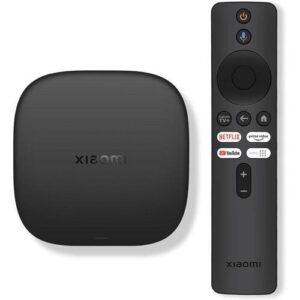
Supports 4K Ultra HD HDR streaming
Powered by Android TV OS
Built-in Google Assistant voice control
Chromecast built-in for easy screen casting
Access to Netflix, YouTube, Prime Video, Showmax and more
Compact, lightweight, and easy to install
Bluetooth remote with voice search
Works with any TV with an HDMI port
| Feature | Specification |
|---|---|
| Detection Methods | UV, MG, IR, Watermark |
| Supported Currencies | USD, EUR, GBP, AED, more |
| Detection Speed | <1 second |
| Display | LCD with backlight |
| Power Source | AC Adapter / Battery (optional) |
| Dimensions | 180 x 120 x 80mm |
| Weight | 650g |
Select at least 2 products
to compare

There are no reviews yet.