
-
×
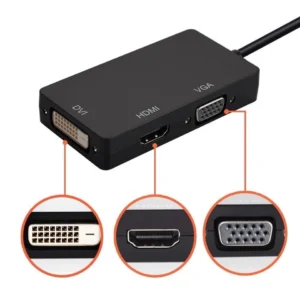 Mini DisplayPort to HDMI, DVI, VGA 3-in-1 Adapter
1 × KSh 2,500.00
Mini DisplayPort to HDMI, DVI, VGA 3-in-1 Adapter
1 × KSh 2,500.00
Subtotal: KSh 2,500.00
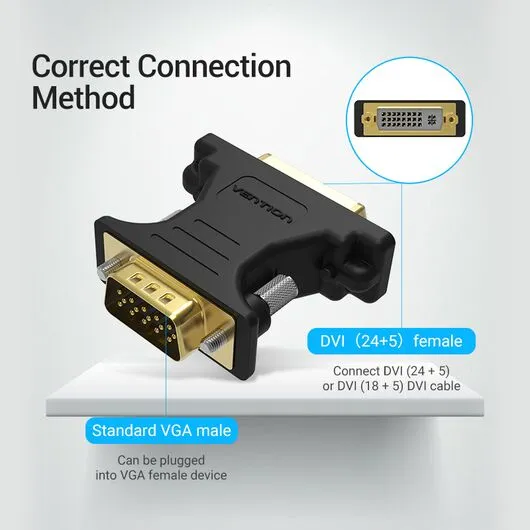
| Feature | Specification |
|---|---|
| Input | VGA (Female) |
| Output | DVI-D (Male) |
| Max Resolution | 1920×1200 @ 60Hz |
| Cable Length | 15cm (fixed adapter) |
| Connector Material | Gold-plated |
| Compatibility | Windows, Mac, Linux |
KSh 400.00
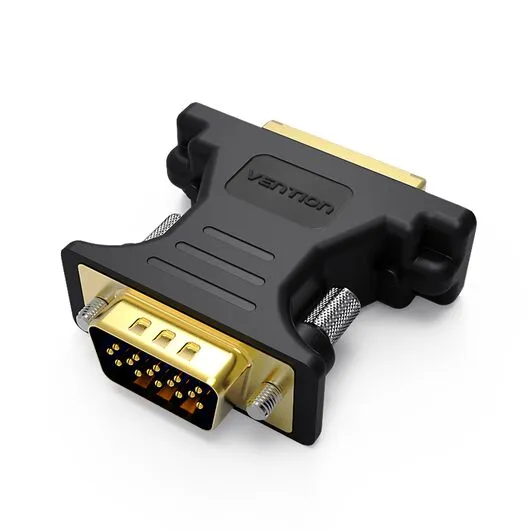
As technology evolves, many businesses and individuals still rely on legacy VGA devices while upgrading to modern DVI displays. The Vention VGA Female to DVI Male Adapter bridges this gap, ensuring seamless compatibility between older computers, projectors, and newer monitors.
At Elvatech, we specialize in high-quality connectivity solutions. This comprehensive guide explores:
Key features that make this adapter indispensable
Real-world applications for home, office, and education
Technical specifications simplified
FAQs answered by AV experts
Why Elvatech is your trusted tech partner
Analog (VGA) to Digital (DVI) conversion without quality loss
Supports resolutions up to 1920×1200 for sharp visuals
No lag or ghosting – ideal for presentations and videos
Works with:
Older desktops & laptops (VGA output)
Modern DVI monitors & projectors
Digital signage & kiosk systems
Gold-plated connectors prevent corrosion
Shielded cable reduces electromagnetic interference
Strain-relief design extends adapter lifespan
No drivers or software needed
Hot-swappable – connect/disconnect without restarting
Compact & lightweight for easy portability
Avoid expensive hardware upgrades
Extend the life of legacy devices
Ideal for multi-monitor setups
✔ Connect older PCs to modern conference room displays
✔ Multi-monitor setups mixing VGA and DVI screens
✔ Digital signage using legacy media players
✔ Link classroom projectors to newer computers
✔ Computer lab upgrades without replacing all hardware
✔ Student presentations on mixed display systems
✔ Use old PCs with new monitors
✔ Gaming setups requiring multiple displays
✔ Home theater connections
✔ Troubleshooting mixed display setups
✔ Extending the lifecycle of older hardware
✔ Emergency adapter for on-site repairs
A: No – it’s a passive adapter drawing power from the VGA port.
A: Only with a DVI-to-HDMI adapter (sold separately).
A: Yes, but maximum 60Hz refresh rate (ideal for casual gaming).
A: No – VGA/DVI carry video only (audio needs separate cable).
A: Yes, if your Mac has VGA output (may need Apple’s Mini DisplayPort adapter).
A: This adapter works with DVI-D only (check your monitor’s port type).
Ensure tight connections to prevent signal dropouts
Set the correct resolution in your OS display settings
Use high-quality VGA cables for optimal clarity
Avoid bending the adapter to protect internal wiring
Update graphics drivers if display issues occur
✔ Businesses with mixed display setups
✔ Schools upgrading gradually
✔ Gamers using secondary monitors
✔ IT departments maintaining legacy systems
✔ Home users extending hardware life
Specs:
| Feature | Specification |
|---|---|
| Input | USB Type-C Male |
| Output Ports | 1x HDMI, 1x VGA, 1x DVI, 1x USB-A 3.0 |
| HDMI Resolution | Up to 3840 x 2160 @ 30Hz (4K) |
| VGA & DVI Resolution | Up to 1920 x 1080 @ 60Hz (Full HD) |
| USB Port | USB 3.0 (up to 5Gbps transfer speed) |
| Compatibility | macOS, Windows, Android, Linux, iPadOS |
| Material | ABS or Aluminum Alloy (varies by model) |
| Power Source | Powered via USB-C, no external power needed |
| Weight | ~60g (compact and portable) |
Short Bullet Specs:
Select at least 2 products
to compare




There are no reviews yet.