
-
×
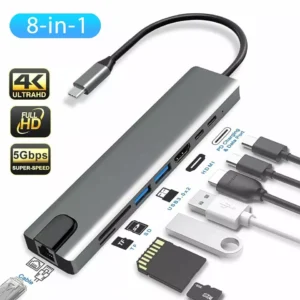 Type-C 8-in-1 Adapter
1 × KSh 2,800.00
Type-C 8-in-1 Adapter
1 × KSh 2,800.00
Subtotal: KSh 2,800.00

specs
Capacity: 4GB
🔹 Type: DDR3
🔹 Speed: 1600MHz (PC3-12800)
🔹 Voltage: 1.35V/1.5V
🔹 Form Factor: 204-pin SODIMM
🔹 CAS Latency: CL11
🔹 Compatibility: Select Samsung laptops
KSh 4,000.00
Is your Samsung laptop feeling sluggish? Over time, as software becomes more demanding, your system may struggle to keep up. One of the most effective ways to revitalize an aging laptop is by upgrading its RAM.
The Samsung 4GB DDR3 1600MHz RAM module at Elvatech is designed to enhance performance, reduce lag, and improve multitasking on compatible laptops. Whether you’re a student, professional, or casual user, this RAM upgrade can breathe new life into your device.
In this blog, we’ll explore:
✔ Why upgrading RAM is beneficial
✔ Key features of this DDR3 RAM module
✔ Compatible Samsung laptop models
✔ Step-by-step installation guide
✔ Answers to common questions
Run multiple applications smoothly (browser tabs, office software, media players)
Reduce frustrating freezes when switching between programs
Decreased loading times for files and applications
Enhanced performance for everyday computing tasks
One of the most affordable ways to extend your laptop’s useful life
Better value than buying a new laptop if your device is otherwise functional
Low voltage requirement (1.35V/1.5V) helps conserve battery life
Generates less heat than older RAM technologies
Manufactured by Samsung for guaranteed compatibility
Rigorously tested for stability and longevity
This RAM module works with many Samsung laptops, including:
✅ Samsung Series 3
✅ Samsung Series 5
✅ Samsung Series 7
✅ Samsung ATIV Book 2
✅ Samsung NP300/350/550 series
Note: Always verify compatibility with your specific model before purchasing.
Turn off laptop and unplug power
Use an anti-static wristband if available
Locate RAM panel on bottom of laptop
Remove screws with Phillips head screwdriver
Align notch on RAM with slot
Insert at 45° angle, then press down until it clicks
Reassemble laptop
Power on and check system properties to confirm new RAM is recognized
✅ Possibly, if your laptop uses DDR3 1600MHz SODIMM RAM. Check your specifications first.
⚠️ Not recommended – best performance comes from matching RAM modules.
Results vary, but most users notice:
Faster application launches
Smoother multitasking
Reduced system freezes
✅ Yes, it works in both standard DDR3 and low-voltage DDR3L (1.35V) slots.
🔧 Yes, contact our support team for professional installation options.
Try:
Reseating the module
Cleaning contacts with isopropyl alcohol
Updating BIOS
✅ Yes, Elvatech provides a lifetime warranty against defects.

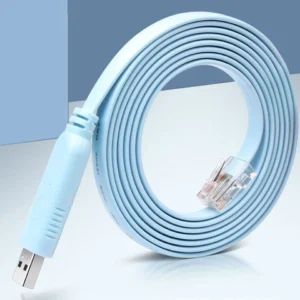
Specs:
| Feature | Details |
|---|---|
| Connector A | RJ45 Male (8P8C) |
| Connector B | DB9 Female (RS232) |
| Compatibility | Cisco, Juniper, TP-Link, MikroTik, Ubiquiti |
| Cable Length | 1.5m–2m (varies by model) |
| Cable Color | Blue (Cisco standard) or Black |
| Build Material | Flexible PVC with molded connectors |
| Pin Mapping | Cisco-compatible wiring standard |
| Speed Support | 9600 bps to 115200 bps (RS232 baud rates) |
| Usage | Console configuration, CLI access |
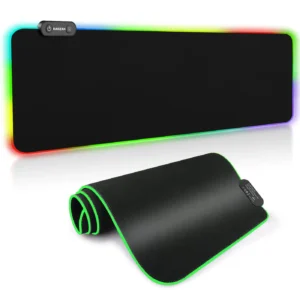
specs
Surface Type: Micro-textured fabric
Base: Anti-slip rubber underside
Size: Medium / Large / XL
Edge: Anti-fray stitched border
Thickness: 3mm
Lighting: Optional RGB (on selected models)
Design: Plain, graphic art, or gaming themes
Compatible With: Optical & laser mice
Select at least 2 products
to compare


There are no reviews yet.