
-
×
 Logitech M185 Grey Wireless Mouse
1 × KSh 2,200.00
Logitech M185 Grey Wireless Mouse
1 × KSh 2,200.00 -
×
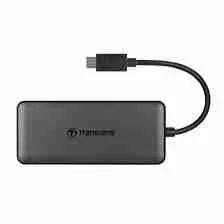 Transcend 4-Port USB 3.1 Hub Gen 1 Type-C
1 × KSh 2,300.00
Transcend 4-Port USB 3.1 Hub Gen 1 Type-C
1 × KSh 2,300.00
Subtotal: KSh 4,500.00

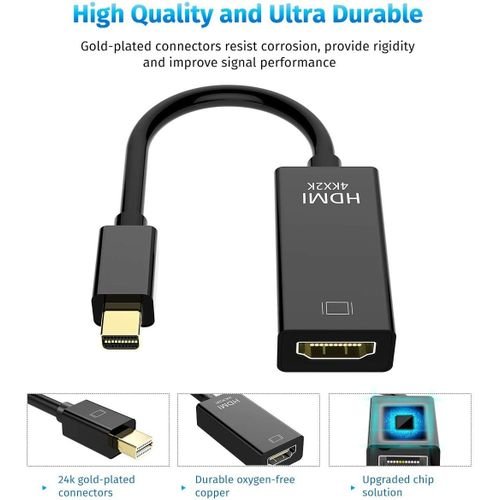
| Feature | Details |
|---|---|
| Input | Mini DisplayPort (male) |
| Output | HDMI (female) |
| Supported Resolutions | Up to 1080p Full HD / 1920×1080 |
| Compatibility | MacBook, Surface Pro, ThinkPad, Ultrabooks |
| Audio Support | Yes (depends on device capability) |
| Build Quality | Compact, lightweight & durable |
| Color | White or black |
| No External Power | Plug-and-play |
KSh 1,000.00
Ever wanted to connect your MacBook, Microsoft Surface, or other Mini DisplayPort-enabled device to an HDMI TV, projector, or monitor? The Mini DisplayPort to HDMI Adapter is your go-to tool.
Whether you’re giving a presentation, streaming a movie, or setting up a home office, this small yet powerful adapter makes screen expansion seamless. Now available at Elvatech Kenya, this adapter bridges the gap between older laptops and modern HDMI displays—instantly and reliably.
As devices evolve, so do ports. Many older laptops and computers come with Mini DisplayPort while most modern displays require HDMI. Instead of replacing your device, this adapter gives you an easy solution to bridge two generations of technology.
Let’s explore why it’s a favorite for students, professionals, and creatives.
No drivers. No installations. No complications.
Just plug the Mini DisplayPort end into your device and connect an HDMI cable to your TV, monitor, or projector. Within seconds, you’re ready to share your screen in full HD.
Enjoy crystal-clear visuals with support for resolutions up to 1080p. Whether you’re watching a movie, showing a PowerPoint, or gaming—everything looks sharp and vibrant.
Use with devices like:
Apple MacBook (Pre-2016 models)
Microsoft Surface Pro 1-3
Lenovo ThinkPad T-series
Dell XPS with Mini DisplayPort
HP EliteBook
Other Mini DisplayPort-equipped devices
You can connect to:
HDMI TVs
Projectors
Computer monitors
AV receivers
Lightweight and durable, this adapter fits easily into your bag, laptop sleeve, or even your pocket. It’s the perfect companion for presenters, remote workers, and traveling professionals.
If your device supports audio over Mini DisplayPort, the adapter can transmit both sound and picture to your HDMI display. That’s fewer cables and a cleaner setup.
| User | Use Case |
|---|---|
| Teachers | Connecting laptops to classroom projectors |
| Businesspeople | Projecting presentations during meetings |
| Students | Watching lectures or tutorials on big screens |
| Remote Workers | Setting up dual monitors or home office displays |
| Gamers/Streamers | Connecting to HDMI monitors or capture cards |
| Movie Lovers | Streaming Netflix, YouTube, etc., to a larger screen |
You’re at a conference. Your laptop has only a Mini DisplayPort, and the projector takes HDMI. With this adapter in your pocket, you’re ready in seconds—no embarrassing tech fails.
Your child is attending classes on a Surface Pro, but the screen is too small. Plug in this adapter to stream the classes on your HDMI TV for better focus and comfort.
Connect your old MacBook to your HDMI monitor and enjoy lag-free gaming or streaming with a bigger view.
Though compact, this adapter features:
Reinforced ports to avoid loosening
Heat-resistant casing
Quality shielding to prevent signal loss
Strong internal wiring for longevity
This isn’t a cheap clone—it’s built to last.
Connect the Mini DisplayPort end to your laptop.
Plug an HDMI cable into the adapter’s HDMI port.
Connect the other end of the HDMI cable to your display.
Select the correct HDMI input on your display.
Done—your screen should now be mirrored or extended.
Yes, if your MacBook has a Mini DisplayPort (pre-2016 models, or Thunderbolt 1/2 ports).
Yes—if your device supports audio over Mini DisplayPort. Most do. Macs and Surface Pros typically support both video and audio.
Absolutely. This adapter is perfect for connecting to TVs via HDMI, especially for streaming or watching videos.
No. It’s completely plug-and-play.
No. This adapter is uni-directional: Mini DisplayPort (source) to HDMI (display). It does not work the other way around.
Yes! You can walk into our Nairobi CBD shop, order through our website, or request same-day delivery.
This standard adapter supports up to 1080p Full HD. If you need 4K support, ask us for our 4K Mini DisplayPort to HDMI Premium Adapter.
| Specification | Details |
|---|---|
| Input Port | USB-C (with Power Delivery) |
| Output Ports | HDMI (4K @ 30Hz) + USB-C PD |
| Data Transfer Speed | USB 3.1 Gen 1 (5Gbps) |
| Power Delivery | Up to 60W (supports fast charging) |
| Cable Length | 1.2 meters |
| Compatibility | Windows, macOS, Chrome OS (varies by device) |
| Certifications | CE, RoHS, FCC |
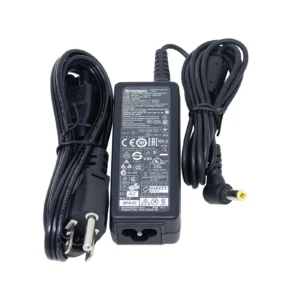
| Feature | Details |
|---|---|
| Input Voltage | 100–240V AC (worldwide use) |
| Output Voltage | 19V DC |
| Output Current | 3.42A or 4.74A (varies by model) |
| Power Output | 65W or 90W |
| Connector Type | 4.5mm round pin |
| Cable Length | Approx. 1.2–1.5 meters |
| Build Quality | Fire-resistant, durable casing |
| Compatibility | Select Lenovo , ThinkPad, etc. |
| Warranty | Yes, with |
| Certifications | CE, FCC, RoHS |
| Feature | Specification |
|---|---|
| Max Resolution | 1080p@60Hz |
| Max Distance | 60m (CAT6) |
| Color Depth | 24-bit (16.7M colors) |
| Latency | <1ms |
| Cable Requirement | CAT6/CAT7 (not included) |
| Power Consumption | 5V/2A (receiver) |
| Dimensions | 120×80×25mm (receiver) |
| Operating Temp | 0°C to 50°C |
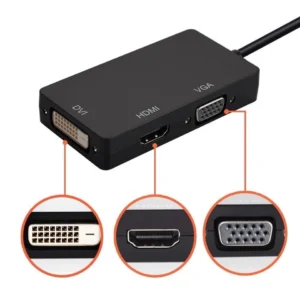
| Feature | Details |
|---|---|
| Input Port | Mini DisplayPort (Male) |
| Output Ports | HDMI (Female), DVI (Female), VGA (Female) |
| Max Resolution HDMI | Up to 1920x1080p Full HD |
| Max Resolution VGA | Up to 1920x1080p |
| Max Resolution DVI | Up to 1920x1080p |
| Audio Support | HDMI output only (depends on device support) |
| Device Compatibility | MacBook, MacBook Pro, Surface Pro, Lenovo, HP laptops |
| Display Mode | Mirror or Extend Display |
| Build | Compact, lightweight, strong ABS shell |
| Power Requirement | No external power needed (plug-and-play) |
Select at least 2 products
to compare



There are no reviews yet.