Description
Logitech M350s Pebble Wireless Mouse – Slim, Stylish & Silent | Available Now at Elvatech
Elevate Your Workspace with the Logitech M350s Wireless Mouse – Now at Elvatech
In a world that values both form and function, your accessories should reflect your lifestyle. Whether you’re grinding through a full day of work, studying on the go, or browsing from the couch, the right mouse can make all the difference. The Logitech M350s Wireless Mouse – also known as the Pebble Mouse 2 – is the perfect blend of modern aesthetics, quiet functionality, and seamless portability.
✔️ Modern Design That Matches Your Style
Most mice look like they were made for an office from the 2000s. The Logitech M350s, however, embraces the present. With a minimalist pebble-like shape, it fits seamlessly into any workspace — whether that’s a marble desk or a dorm-room table. Its slim profile lets you slide it into laptop bags and organizers without bulk, while the soft rounded edges offer a satisfying grip.
✔️ SilentTouch – Clicks Without the Noise
Using the latest SilentTouch technology, the M350s reduces clicking noise by over 90%. You get the same tactile feel, but none of the sound. Whether you’re working during online meetings, studying late at night, or scrolling quietly in a coffee shop, this mouse ensures you stay productive without disturbing others.
✔️ Dual Connectivity: Bluetooth or USB
Unlike many wireless mice, the Logitech M350s gives you two connection options:
-
Bluetooth for quick, wire-free pairing with tablets, laptops, and smartphones
-
2.4GHz USB receiver for instant plug-and-play on desktops or older systems
Switch between devices in seconds. This flexibility is perfect for users juggling multiple setups — like a MacBook and a PC, or a Chromebook and a tablet.
✔️ Long Battery Life for the Long Haul
Forget about frequent battery changes. The M350s runs for up to 2 years on a single AA battery, thanks to its efficient power management and auto-sleep feature when idle. That’s two years of smooth scrolling and clicking — without ever needing a charge.
✔️ Customizable Center Button
The middle button on the scroll wheel isn’t just for clicks. Through the Logi Options+ software, you can customize it to open your favorite app, take a screenshot, switch desktops, or perform other functions. That’s an extra layer of productivity in a simple package.
Designed for the Way You Work
The Logitech M350s isn’t just another mouse — it’s tailored to your habits, your environment, and your comfort.
💻 For Remote Workers
Stay productive and professional with whisper-quiet performance during meetings or shared workspaces.
📚 For Students
Lightweight, portable, and compatible with Chromebooks and tablets, it’s a top pick for study sessions anywhere.
✈️ For Travelers
Its compact design slips effortlessly into bags and pockets. And the dual connectivity means no stress about forgotten dongles.
🎨 For Creatives
From casual designing to document editing, the M350s delivers pixel-precise tracking and a satisfying user experience.
What’s in the Box?
FAQs – Logitech M350s Wireless Mouse
Q1: Does the M350s work with iPads?
A: Yes! It supports iPadOS and connects via Bluetooth for smooth navigation.
Q2: Can I use it with both Mac and Windows?
A: Absolutely. It’s fully compatible with both macOS and Windows platforms.
Q3: Is the mouse rechargeable?
A: No, it uses a single AA battery, which lasts up to 24 months. No need to recharge.
Q4: Is the clicking truly silent?
A: Logitech’s SilentTouch tech makes the clicks up to 90% quieter than standard mice. It’s not 100% silent but very discreet.
Q5: Can I remap buttons?
A: The middle (scroll wheel) button is customizable through Logi Options+ software.
Q6: What should I do if I lose the receiver?
A: You can still connect via Bluetooth if the USB receiver is lost. Replacement receivers are also available.
Q7: How far can I use the mouse from my device?
A: Up to 10 meters of wireless range — for both Bluetooth and USB.
Q8: Is it good for gaming?
A: It’s optimized for daily use and productivity — not competitive gaming. For gaming, Logitech’s G series is better suited.
Q9: Can I carry it in my pocket?
A: Yes! The M350s is slim and lightweight, perfect for travel or pocket carry.
Q10: How do I switch between Bluetooth and USB modes?
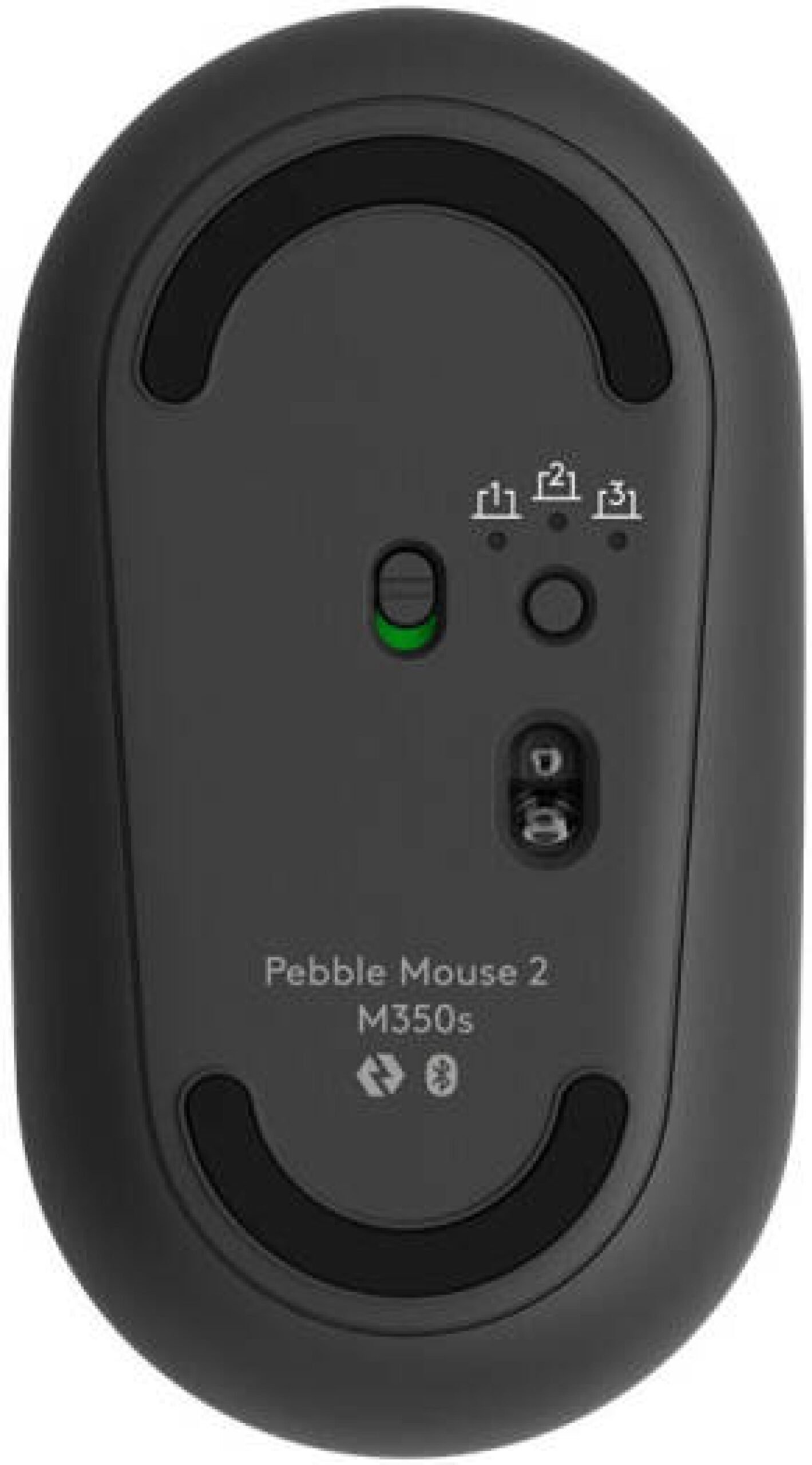
A: Use the small toggle button on the underside of the mouse to switch between the two connection modes.
Productivity Has Never Looked This Good
With its ultra-quiet clicks, featherweight body, stylish design, and dual connectivity, the Logitech M350s is a perfect companion for everyday digital life. It’s elegant without being over-designed, efficient without being over-complicated, and quiet without being lifeless.
Whether you’re in a classroom, boardroom, or living room — this is the mouse that fits your space and pace.

 Slice Link 10000mAh 12W Power Bank oraimo
1 × KSh 2,800.00
Slice Link 10000mAh 12W Power Bank oraimo
1 × KSh 2,800.00  Mini DisplayPort to VGA Adapter
1 × KSh 1,200.00
Mini DisplayPort to VGA Adapter
1 × KSh 1,200.00  USB Modem
1 × KSh 2,000.00
USB Modem
1 × KSh 2,000.00  Analog to Digital Converter
1 × KSh 2,000.00
Analog to Digital Converter
1 × KSh 2,000.00  BOAFENG DUAL WALKIE TALKIE
1 × KSh 5,500.00
BOAFENG DUAL WALKIE TALKIE
1 × KSh 5,500.00  HDMI Extender HD 1080p 60M
1 × KSh 4,000.00
HDMI Extender HD 1080p 60M
1 × KSh 4,000.00 




There are no reviews yet.