

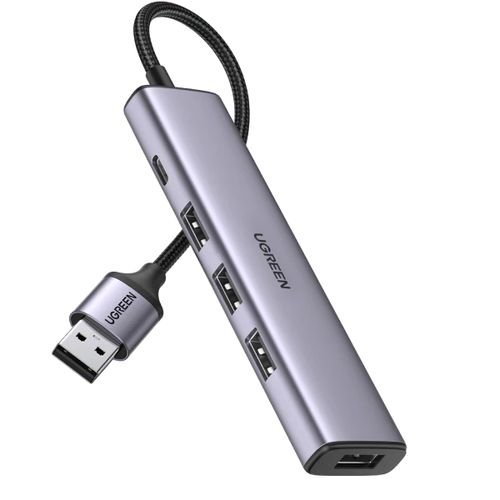
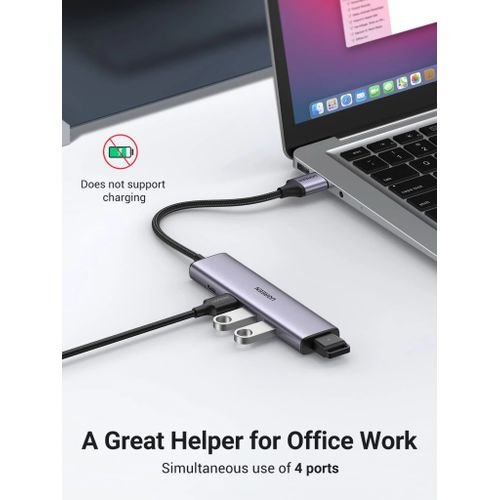
UGREEN USB 3.0 Hub – Expand Your Connectivity with High-Speed Ports
In today’s tech-driven world, running out of USB ports is a common frustration. Whether you’re connecting a mouse, keyboard, external hard drive, or flash drive, a single USB port just isn’t enough. The UGREEN USB 3.0 Hub solves this problem by instantly adding four high-speed USB 3.0 ports to your laptop or desktop.
Available at Elvatech, this compact yet powerful hub ensures fast data transfers, stable connections, and broad compatibility with various devices. In this blog, we’ll explore its features, benefits, ideal use cases, and FAQs to help you decide if it’s the right choice for your setup.
Why Choose the UGREEN USB 3.0 Hub?
1. SuperSpeed USB 3.0 Performance
With 5Gbps transfer speeds, this hub is 10x faster than USB 2.0, making it ideal for:
-
Transferring large files in seconds
-
Backing up data quickly
-
Streaming HD media without lag
2. Plug-and-Play Simplicity
No drivers or software needed—just plug it in, and it works instantly with:
✅ Windows (7/8/10/11)
✅ macOS (10.6+)
✅ Linux
✅ Chrome OS
3. Compact & Portable Design
-
Sleek, lightweight aluminum casing (prevents overheating)
-
Short cable (15cm) for clutter-free setups
-
Perfect for travel, office, and home use
4. Simultaneous Multi-Device Support
Connect four devices at once without slowdowns:
-
External HDD/SSD
-
USB flash drives
-
Keyboard & mouse
-
Printers, card readers, and more
5. Backward Compatibility
Works with USB 2.0 and 1.1 devices, though at lower speeds.
Who Should Use This USB Hub?
1. Professionals & Office Workers
-
Expand a laptop’s limited ports for peripherals (mouse, keyboard, flash drives)
-
Quickly transfer files between external drives and computers
2. Gamers & Streamers
-
Connect multiple accessories (gaming mouse, controller, headset dongle)
-
Avoid unplugging devices repeatedly
3. Students & Content Creators
-
Ideal for notebooks with few USB ports
-
Transfer photos, videos, and project files rapidly
4. Home & Entertainment Use
-
Connect media drives, wireless adapters, and smart home devices
-
Keep your workspace organized and cable-free
Frequently Asked Questions (FAQ)
Q1: Does this hub require external power?
No, it’s bus-powered, meaning it draws power directly from your laptop/PC. However, for high-power devices (like external HDDs), a powered USB hub is recommended.
Q2: Can I charge my phone with this hub?
Yes, but only for data transfer and slow charging. For fast charging, use a dedicated charger.
Q3: Will it work with USB-C laptops?
Yes, but you’ll need a USB-C to USB-A adapter (since this hub has a standard USB-A connector).
Q4: Does it support USB 2.0 devices?
Yes, but speeds will be limited to USB 2.0 (480Mbps).
Q5: Can I use it with a PlayStation or Xbox?
Yes, it works with PS4, PS5 (for peripherals), and Xbox (for storage devices).
Q6: Why is my external HDD not working?
Some high-power HDDs may need an externally powered hub. Try connecting the drive directly to your PC first.
Q7: Does it support fast data transfer for 4K video editing?
Yes, USB 3.0’s 5Gbps speed is sufficient for 4K video files, but an SSD will perform better than an HDD
Based on 0 reviews
Be the first to review “UGREEN USB 3.0 Hub”
Related products
-
Computing
1×8 HDMI Splitter
Feature Specification Input Ports 1x HDMI (Female) Output Ports 8x HDMI (Female) Max Resolution 4K@30Hz (3840×2160) Supported Formats 480i/576i/480p/576p/720p/1080i/1080p/4K HDCP Compliance 1.4/2.2 Bandwidth 10.2Gbps Power Supply 5V/2A USB (included) Dimensions 150 x 85 x 25mm SKU: n/a -
Computing
1080P Mini VGA to AV RCA Converter
Feature Specification Input Resolution Up to 1920×1080@60Hz Output Format NTSC/PAL composite video Input Connector 15-pin VGA (HD-15) Output Connectors RCA (Yellow), Stereo Audio (Red/White) Power Requirement VGA port powered (no adapter) Dimensions 75×45×18mm Weight 98g Operating Temp 0°C to 50°C SKU: n/a -


There are no reviews yet.