

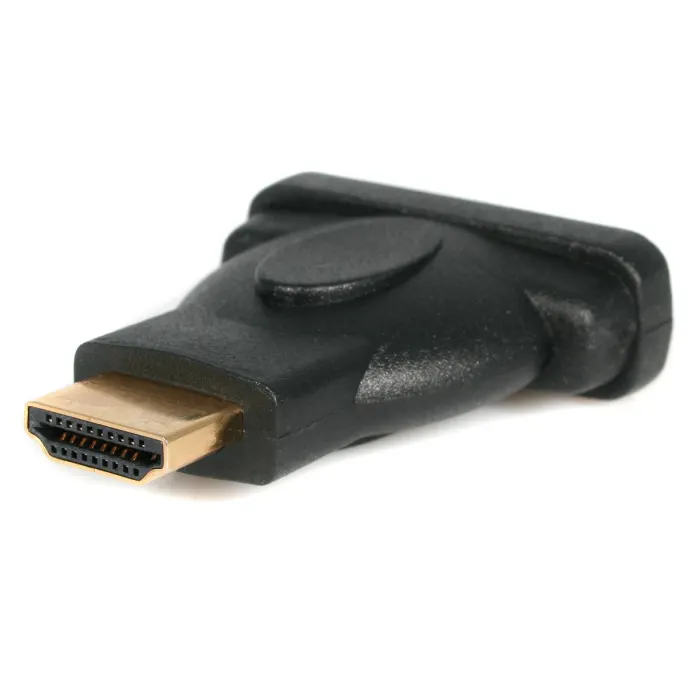
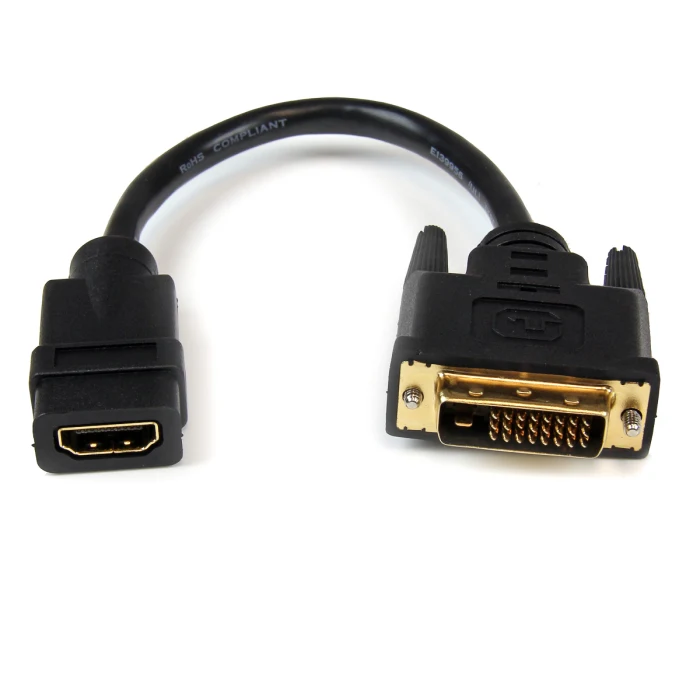
Male HDMI to Female DVI-D Connector
| Feature | Specification |
|---|---|
| Connector Type | HDMI Male to DVI-D Female |
| Max Resolution | 1920×1200@60Hz (Single-Link) |
| Bandwidth | 4.95 Gbps |
| HDCP Support | 1.4/2.2 (Source Dependent) |
| Contact Material | Gold-plated phosphor bronze |
| Insertion Cycles | 10,000+ |
| Operating Temp | -20°C to 70°C |
KSh 450.00
Male HDMI to Female DVI-D Connector – The Smart Digital Bridge at Elvatech
In today’s hybrid technology environment, the need to connect modern HDMI sources to legacy DVI-D displays is more common than ever. Whether you’re a gamer preserving a high-refresh monitor, a business extending the life of office equipment, or a home theater enthusiast integrating components, the Male HDMI to Female DVI-D Connector from Elvatech provides the perfect digital bridge.
At Elvatech, we engineer connectivity solutions that combine performance with practicality. This definitive guide covers:
-
Precision engineering behind our adapter
-
Optimal use cases across different scenarios
-
Technical specifications demystified
-
Professional installation insights
-
FAQs answered by AV specialists
-
Elvatech’s quality promise
Why This Connector is Essential
1. Digital Purity
-
Direct pin-to-pin digital connection (no analog conversion)
-
Preserves 1080p@60Hz quality without compression
-
24-bit color depth maintains original vibrancy
2. Universal Compatibility
-
Works with:
-
Next-gen consoles (PS5, Xbox Series X)
-
Streaming devices (Fire Stick, Roku)
-
Business laptops and docking stations
-
DVI-D monitors (single-link and dual-link)
-
3. Military-Grade Durability
-
Aerospace aluminum housing for EMI shielding
-
Gold-plated contacts (30μ”) resist oxidation
-
Strain-relief collar prevents cable damage
4. Intelligent Design
-
Low-profile form factor (40×18×10mm)
-
Directional indicator for proper orientation
-
Tool-free installation in seconds
5. Future-Proof Value
-
Extends monitor lifespan 3-5 years
-
Eliminates need for expensive upgrades
-
Backward compatible with HDMI 1.4+ devices
-
Real-World Applications
For Competitive Gamers
✔ Maintain 144Hz refresh rates on DVI monitors
✔ Reduce input lag versus wireless solutions
✔ Tournament-ready stable connectionsFor Digital Workspaces
✔ Connect modern laptops to legacy monitors
✔ Multi-display configurations for traders
✔ CAD/CAM workstation extensionsFor Home Theaters
✔ Integrate Blu-ray players with projector systems
✔ Stream 4K content (downscaled to 1080p)
✔ DIY projector installationsFor AV Professionals
✔ Equipment rack patching
✔ Emergency signal routing
✔ Trade show display configurations
Frequently Asked Questions
Q1: Will this work with DVI-I ports?
A: Only the digital portion of DVI-I will function
Q2: Can I transmit 4K resolution?
A: Maximum 1080p – for 4K consider active converters
Q3: Does it support audio return?
A: No – DVI is video-only (requires separate audio cable)
Q4: Will it work with Apple M1/M2 devices?
A: Yes, when using Apple’s USB-C to HDMI adapter
Q5: Can I daisy-chain multiple adapters?
A: Not recommended – may cause signal degradation
Q6: Is there noticeable input lag?
A: <0.5ms – imperceptible even for esports
Professional Installation Guide
-
Power off devices before connecting
-
Secure the locking screws on DVI side
-
Route cables carefully to avoid strain
-
Set native resolution in display settings
-
Test with different content (games/video/static)
Why Elvatech Stands Apart
1. Certified Performance
-
HDMI.org compliant testing
-
Batch-tested for signal integrity
2. Rapid UAE Delivery
-
Same-day Dubai dispatch
-
Free shipping over AED 200
3. Technical Support
-
AV engineers on call
-
Custom bulk solutions
4. Unmatched Warranty
-
Lifetime connector guarantee
-
Based on 0 reviews
Be the first to review “Male HDMI to Female DVI-D Connector”
Related products
-
Computing
4K HDMI to 1080p Video Capture
Feature Specification Input Resolution 4K@60Hz (3840×2160) Output Resolution 1080p@60Hz (1920×1080) Color Depth 8/10-bit 4:2:2 Latency 82ms (1080p60) USB Interface USB 3.0 (5Gbps) Supported Codecs H.264, MJPEG, YUY2 Dimensions 98×62×22mm OS Compatibility Windows 10/11, macOS 10.15+, Linux SKU: n/a -
Computing
Analog to Digital Converter
Feature Specification Resolution 24-bit Sample Rates 44.1kHz to 192kHz THD+N <0.001% Inputs RCA, 3.5mm, XLR (pro version) Output Formats WAV, FLAC, MP3, AIFF USB Interface USB 2.0/3.0 (32-bit float support) Dimensions 120×80×35mm Power USB bus or external 5V DC SKU: n/a -
Adapters, Computing
Lenovo USB-C to HDMI + Power Adapter
Specification Details Input Port USB-C (with Power Delivery) Output Ports HDMI (4K @ 30Hz) + USB-C PD Data Transfer Speed USB 3.1 Gen 1 (5Gbps) Power Delivery Up to 60W (supports fast charging) Cable Length 1.2 meters Compatibility Windows, macOS, Chrome OS (varies by device) Certifications CE, RoHS, FCC SKU: n/a -
Computing, mouse
Logitech M350s Slim Bluetooth Wireless Mouse -pebble Graphite
Specifications
-
Model: Logitech M350s Pebble Wireless Mouse
-
Connectivity: Dual (Bluetooth + USB Receiver)
-
Clicks: Silent Touch Technology (ultra-quiet)
-
Battery Life: Up to 24 months (1 x AA battery)
-
Sensor: High Precision Optical Tracking
-
Buttons: 3 (Left, Right, Scroll + customizable center button)
-
Compatibility: Windows, macOS, iPadOS, ChromeOS, Linux
-
Shape: Slim, flat, portable
-
Weight: ~76g (with battery)
SKU: n/a -


There are no reviews yet.