

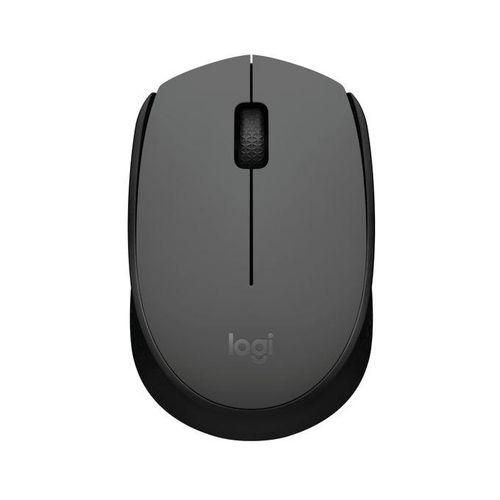
Logitech M171 Graphite Mouse
Specifications
- Reliable 2.4GHz wireless connectivity for smooth everyday use
-
Plug-and-play USB receiver for quick and easy setup
-
Comfortable ambidextrous design for left- and right-handed users
-
Smooth optical tracking for accurate cursor control
-
Lightweight and portable for home, office, or travel use
-
Modern graphite finish for a clean, professional look
KSh 1,999.00
Logitech M171 Graphite Mouse
The Logitech M171 Graphite Mouse is a reliable wireless mouse designed for smooth and comfortable everyday computing. Its compact design and dependable performance make it ideal for home, office, and on-the-go use.
Using a stable 2.4GHz wireless connection, the Logitech M171 delivers responsive cursor control with minimal lag or interference. The small USB receiver allows easy plug-and-play setup, enabling you to start working immediately without additional software installation.
The mouse features a comfortable ambidextrous shape, making it suitable for both left- and right-handed users. Its optical tracking provides accurate and smooth movement on most surfaces, ensuring efficient navigation for work, study, and general computer tasks. With efficient power management and long battery life, the Logitech M171 is a practical choice for daily use.
Key Features
-
2.4GHz wireless connectivity for stable and consistent performance
-
Compact USB receiver for easy plug-and-play setup
-
Comfortable ambidextrous design for left- and right-handed users
-
Smooth optical tracking for accurate cursor control
-
Lightweight and portable for everyday use
-
Long battery life for uninterrupted productivity
-
Graphite finish for a clean, modern look
Frequently Asked Questions (FAQ)
Is the Logitech M171 a wireless mouse?
Yes. The Logitech M171 uses a 2.4GHz wireless connection via a USB receiver.Is the Logitech M171 compatible with laptops and desktops?
Yes. It works with laptops and desktop computers that have a USB port.Can left-handed users use the Logitech M171?
Yes. The ambidextrous design makes it suitable for both left- and right-handed users.Does the Logitech M171 require software installation?
No. It is plug-and-play and works immediately after connecting the USB receiver.What is the Logitech M171 best used for?
It is ideal for browsing, office work, studying, and general everyday computer tasks.
Based on 0 reviews
Be the first to review “Logitech M171 Graphite Mouse”
Related products
-
Computer Accessories
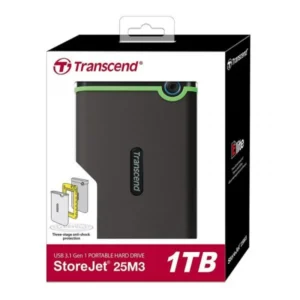
Transcend 1TB External Hard Drive
-
Storage Capacity: 1TB
-
Interface: USB 3.1 Gen 1 (backward compatible with USB 2.0)
-
Transfer Speed: Up to 5Gbps
-
Shock Resistance: Yes (Three-stage anti-shock system)
-
Compatibility: Windows, macOS, Linux
-
Casing: Rugged silicone outer shell
-
Software: Transcend Elite (backup and restore)
-
Dimensions: Approx. 129.5mm x 82.4mm x 16.1mm
-
Weight: ~185g
-
Warranty: 3 years (model-dependent)
SKU: n/a -
-
Computer Accessories, mouse
Logitech M190 Grey Wireless Mouse
-
Full-size ergonomic shape designed for all-day comfort
-
Smooth 2.4GHz wireless performance with stable connectivity
-
High-precision optical sensor for accurate and responsive tracking
-
Instant plug-and-play setup using a compact USB receiver
-
Long battery life for uninterrupted daily productivity
-
Neutral grey finish suitable for home and office use
SKU: n/a -
-
Computer Accessories, mouse
Logitech M235 Colt Matte Wireless Mouse
Specifications
- Compact curved design for comfortable everyday control
-
Stable 2.4GHz wireless connection for smooth performance
-
Matte finish for improved grip and durability
-
Accurate optical tracking for precise cursor movement
-
Plug-and-play USB receiver for instant use
-
Lightweight and portable, ideal for laptop users and travel
SKU: n/a -
mouse
M330 Silent plus mouse
Specifications
- Silent click technology (over 90% noise reduction)
- 2.4 GHz wireless connectivity
- USB nano receiver
- Up to 10m wireless range
- 24-month battery life
- Advanced optical tracking
- Ergonomic right-hand design
- Rubber side grips for comfort
- Plug-and-play setup
- Compatible with Windows, macOS, Linux, Chrome OS
SKU: n/a


There are no reviews yet.