

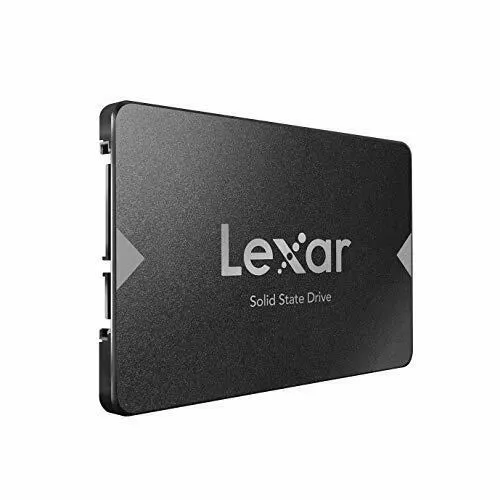
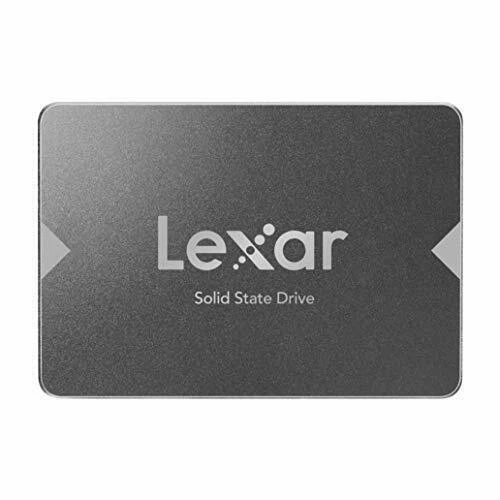
Lexar 512GB 2.5″ SSD
specs
Capacity: 512GB
Form Factor: 2.5-inch (7mm)
Interface: SATA III (6Gb/s)
Max Read Speed: 550MB/s
Max Write Speed: 500MB/s
NAND Type: 3D TLC
Shock Resistance: 1500G
Operating Temp: 0°C to 70°C
KSh 4,500.00
Lexar 512GB 2.5″ SSD at Elvatech – Lightning-Fast Storage Upgrade for Your Device
Is your computer slowing down? Are you tired of waiting for files to load or programs to open? The problem might be your old hard drive. Traditional HDDs are slow, noisy, and prone to failure over time.
The Lexar 512GB 2.5″ SSD is the perfect solution to revitalize your laptop or desktop. With blazing-fast speeds, silent operation, and shock resistance, this SSD delivers a noticeable performance boost for everyday computing, gaming, and professional work.
At Elvatech, we offer genuine Lexar SSDs with high-quality NAND flash memory for long-lasting reliability. In this blog, we’ll explore:
✔ Why upgrading to an SSD is worth it
✔ Key features of the Lexar 512GB SSD
✔ Compatible devices & installation tips
✔ Performance comparisons (SSD vs. HDD)
✔ Frequently asked questions
Why Upgrade to the Lexar 512GB SSD?
1. Lightning-Fast Speeds
-
Read speeds up to 550MB/s – Launch applications in seconds
-
Write speeds up to 500MB/s – Transfer files quickly
2. Reliable & Durable
-
No moving parts – More shock-resistant than HDDs
-
Lower power consumption – Extends laptop battery life
3. Silent & Cool Operation
-
No spinning disks – Zero noise, perfect for quiet environments
-
Reduced heat generation – Better system stability
4. Easy Installation
-
Standard 2.5″ form factor – Fits most laptops and desktops
-
No software tweaks needed – Plug-and-play compatibility
5. Affordable Storage Upgrade
-
512GB capacity – Ideal for OS, apps, and essential files
-
Cost-effective – Much cheaper than buying a new computer
-
Who Should Use This SSD?
1. Laptop Users Seeking Speed
-
Replace slow HDDs for faster boot times
-
Extend the life of an older laptop
2. Gamers Needing Quick Load Times
-
Reduce in-game loading screens
-
Improve overall system responsiveness
3. Professionals Handling Large Files
-
Edit photos/videos faster
-
Quick access to databases and documents
4. Students & Casual Users
-
Speed up web browsing and multitasking
-
Affordable storage upgrade
Performance Comparison: SSD vs. HDD
Task Traditional HDD Lexar 512GB SSD Boot Time 45-60 seconds 10-15 seconds File Transfer (10GB) 3-5 minutes 20-30 seconds Application Launch Slow Instant Noise Level Audible spinning Silent Durability Prone to damage Shock-resistant
Frequently Asked Questions (FAQ)
Q1: Is this SSD compatible with my laptop?
Yes, if your laptop has a 2.5-inch SATA bay (most models do).
Q2: Can I clone my old HDD to this SSD?
Yes, use free tools like Macrium Reflect or Clonezilla.
Q3: Does it include a cloning cable or enclosure?
No, but Elvatech offers bundled upgrade kits (sold separately).
Q4: How long will this SSD last?
Decades under normal use – SSDs typically outlast HDDs.
Q5: Is it good for gaming?
Yes! Faster load times than HDDs, though NVMe is even quicker.
Q6: Can I use this in a PlayStation/Xbox?
Yes, works with PS4/PS4 Pro and Xbox One (not PS5/Xbox Series X).
Q7: Does it need special drivers?
No, plug-and-play on Windows, macOS, Linux.
-
Based on 0 reviews
Be the first to review “Lexar 512GB 2.5″ SSD”
Related products
-
Adapters, Computer Accessories
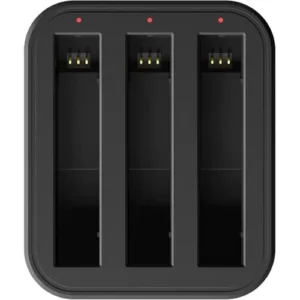
INSTA360 Fast Charging Hub
Feature Details Product Type Multi-slot battery charging hub Compatibility INSTA360 X3, X4, or GO batteries (model-specific) Charging Slots 2–3 batteries simultaneously Charging Speed Up to 3x faster than USB charging Charging Time Approx. 60–90 mins for full charge Input Interface USB-C (PD power delivery supported) Power Source Wall adapter or USB power bank Material Durable ABS plastic, anti-slip base LED Indicators Real-time charge status lights per slot Safety Features Overcharge, overheat, and short-circuit protection SKU: n/a -
Computer Accessories, mouse
M170 Logitech mouse
Specifications
* Wireless Technology: 2.4 GHz
* Wireless Range: Up to 10 meters
* Connection Type: USB Nano Receiver
* Sensor: Optical Tracking
* Battery Type: 1 × AA Battery
* Battery Life: Up to 12 months
* Buttons: 3 (Left, Right, Scroll Wheel)
* Compatibility: Windows, macOS, Linux, ChromeOS
* Design: Ambidextrous (Left & Right Hand Use)—
SKU: n/a -
Computer Accessories
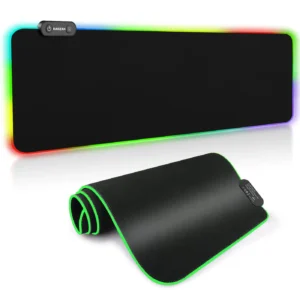
Gaming Mouse Pad
Specifications
- Micro-textured fabric
-
Base: Anti-slip rubber underside
-
Size: Medium / Large / XL
-
Edge: Anti-fray stitched border
-
Thickness: 3mm
-
Lighting: Optional RGB (on selected models)
-
Design: Plain, graphic art, or gaming themes
-
Compatible With: Optical & laser mice
SKU: n/a


There are no reviews yet.