


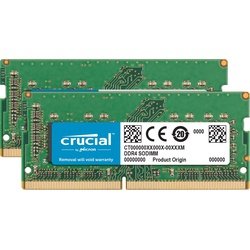
Samsung Laptop RAM 8GB DDR3 1600MHz
Specifications
Capacity: 8GB Single Module
Type: DDR3 SDRAM
Speed: 1600MHz (PC3-12800)
Voltage: 1.35V/1.5V (Auto-Selecting)
Form Factor: 204-pin SODIMM
CAS Latency: CL11
Error Checking: Non-ECC
KSh 4,500.00
Samsung Laptop RAM 8GB DDR3 1600MHz – Supercharge Your Laptop’s Performance
Is your Samsung laptop struggling to keep up with modern applications? Do you experience frustrating lag when switching between programs? The solution might be simpler than you think.
The Samsung 8GB DDR3 1600MHz RAM module at Elvatech is designed to dramatically improve your laptop’s responsiveness, allowing you to run more applications simultaneously without slowdowns. Whether you’re a student crunching numbers, a professional handling large files, or a casual user browsing the web, this RAM upgrade can transform your computing experience.
In this comprehensive guide, we’ll explore:
✔ The tangible benefits of upgrading to 8GB RAM
✔ Technical specifications that matter
✔ Compatible Samsung laptop models
✔ Easy installation instructions
✔ Answers to common upgrade questions
Why Upgrade to 8GB DDR3 1600MHz RAM?
1. Professional-Grade Multitasking
-
Effortlessly run office suites, web browsers (20+ tabs), and media players simultaneously
-
Handle medium-sized datasets in Excel without freezing
2. Future-Proof Performance
-
Meet minimum requirements for Windows 10/11 and modern applications
-
Extend your laptop’s useful life by 2-3 years
3. Noticeably Faster Operations
-
50-70% reduction in application load times
-
Smoother video playback and basic photo editing
4. Energy Efficient Design
-
1.35V low-voltage option preserves battery life
-
Samsung’s quality manufacturing ensures stable power consumption
5. Cost-Effective Solution
-
Fraction of the cost of a new laptop
-
Resale value boost for your current device
-
Compatible Samsung Laptop Models
installation Made Simple (5 Steps)
1. Safety First
-
Power down completely and unplug charger
-
Remove battery if possible
2. Access RAM Bay
-
Locate service panel on bottom case
-
Use Phillips #0 screwdriver to remove cover
3. Install New Module
-
Align notch with slot key
-
Insert at 45° angle, then press down firmly until clips engage
4. Verify Operation
-
Reassemble and power on
-
Check System Properties or Task Manager to confirm 8GB recognition
5. Optimize Performance
-
Update BIOS if needed
-
Adjust virtual memory settings
Frequently Asked Questions (FAQ)
Q1: Will this work with my DDR3L laptop?
✅ Yes – The module automatically adjusts between 1.35V (DDR3L) and 1.5V (DDR3).
Q2: Can I add this to my existing 4GB stick?
-
-
Possible but not ideal – For best results, use matching capacity modules.
Q3: How does this compare to DDR4 RAM?
DDR3 Pros: More affordable, compatible with older systems
DDR4 Pros: Higher speeds, better power efficiencyQ4: Will this improve gaming performance?
Moderately – Helps with loading times but won’t replace GPU upgrades.
Q5: Is professional installation available?
Yes – Elvatech offers certified installation services at select locations.
Q6: Why is my system only showing 3.5GB available?
Check:
-
32-bit OS limitation (upgrade to 64-bit)
-
Integrated graphics reserving memory
Q7: What if the RAM isn’t recognized?
Troubleshooting steps:
-
Reseat the module
-
Try different slot
-
Update BIOS
-
Test with MemTest86
-
Based on 0 reviews
Be the first to review “Samsung Laptop RAM 8GB DDR3 1600MHz”
Related products
-
Computer Accessories, mouse
Logitech M171 Blue-Grey Mouse
Specifications
-
Smooth wireless control with stable 2.4GHz connection
-
Comfortable shape designed for both left and right hands
-
Precise optical sensor for accurate everyday navigation
-
Compact USB receiver for instant plug-and-play use
-
Lightweight design ideal for work, study, and travel
-
Stylish blue-grey finish that suits modern setups
SKU: n/a -
-
Computer Accessories
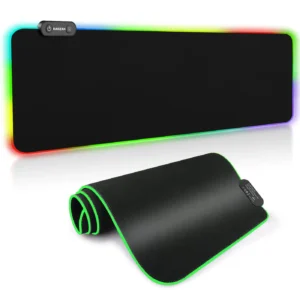
Gaming Mouse Pad
Specifications
- Micro-textured fabric
-
Base: Anti-slip rubber underside
-
Size: Medium / Large / XL
-
Edge: Anti-fray stitched border
-
Thickness: 3mm
-
Lighting: Optional RGB (on selected models)
-
Design: Plain, graphic art, or gaming themes
-
Compatible With: Optical & laser mice
SKU: n/a -
Computer Accessories
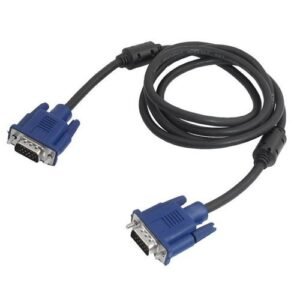
VGA Cable 2M
Feature Details Cable Length 2 Meters Connector Type VGA Male to VGA Male (15-pin) Resolution Support Up to 1080p (Full HD) Cable Shielding Double-foil & braid shielding Outer Material PVC jacket for durability Signal Type Analog video Compatibility PCs, Laptops, Projectors, Monitors Locking Mechanism Screw-in male connectors SKU: n/a -
Software
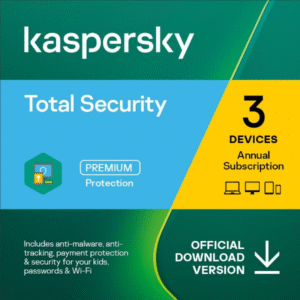
Kaspersky Total Security 3 Devices + 1 License
Kaspersky Total Security 3 Devices + 1 License
Available in stock
- Brand: Kaspersky
- Product: Kaspersky Total Security
- Devices Covered: 3 devices + 1 Free
- License Duration: Typically 1 year
- Supported Platforms: PC, Mac, Android, iOS
Kaspersky Total Security 3 Devices + 1 License Price in Kenya
Ultimate Digital Defense for Your Entire Tech Ecosystem
Kaspersky Total Security 3 Devices + 1 License is the pinnacle of digital protection, offering a comprehensive shield for your interconnected digital life. This premium antivirus solution provides:
- Ironclad security for 3 devices of your choice
- A bonus license for an additional device
- Unparalleled protection across all your digital touchpoints
In today’s hyper-connected world, where threats lurk around every digital corner, Kaspersky Total Security stands as your unwavering guardian, ensuring that your entire tech ecosystem remains impervious to cyber threats.
Key Benefits: Your All-in-One Cyber Fortress
- http://elvatechaccessories.co.keMulti-Device Harmony:
- Seamlessly protect your laptops, desktops, tablets, and smartphones
- Enjoy consistent, top-tier security across Windows, macOS, Android, and iOS platforms
- Advanced Threat Detection:
- Utilizes AI and machine learning to identify and neutralize emerging threats
- Provides real-time protection against malware, ransomware, and zero-day exploits
- Secure Online Transactions:
- Implements a fortified environment for online banking and shopping
- Encrypts your data to thwart interception by cybercriminals
- Privacy Sentinel:
- Blocks unauthorized webcam access to prevent digital eavesdropping
- Includes a VPN for anonymous browsing with a generous daily allowance
- Comprehensive Family Protection:
- Robust parental controls to manage and monitor children’s online activities
- GPS child locator for peace of mind (on compatible devices)
In-Depth Technical Features
Kaspersky Total Security is packed with cutting-edge technologies to keep you safe:
- Adaptive Security Engine:
- Dynamically adjusts protection levels based on your activities
- Balances security and performance for an optimal user experience
- Behavioral Analysis and Exploit Prevention:
- Uses advanced heuristics to identify suspicious behavior patterns
- Prevents exploitation of vulnerabilities in your operating system and applications
- Network Threat Protection:
- Monitors both incoming and outgoing network traffic
- Blocks malicious connections and prevents data exfiltration
- Ransomware Reversal:
- Automatically backs up files when ransomware-like behavior is detected
- Allows easy restoration of encrypted files, nullifying ransomware attacks
- Data Encryption:
- Provides military-grade encryption for your sensitive files
- Ensures your private information remains private, even if your device is lost or stolen
Why Kaspersky Total Security Reigns Supreme
Kaspersky has consistently been at the forefront of the antivirus industry. Here’s what sets Total Security apart:
- Holistic Protection: Covers all aspects of your digital life, from device security to online privacy
- Resource-Efficient Design: Delivers maximum protection with minimal impact on system performance
- Continuous Improvement: Regular updates and machine learning ensure adaptability to new threats
- User-Centric Interface: Intuitive controls make advanced security accessible to all users
- Cross-Platform Excellence: Maintains high standards of protection across all supported platforms
Premium Features That Make a Difference
- Password Manager Deluxe:
- Store and sync unlimited passwords across all your devices
- Generate complex passwords and securely share credentials with trusted contacts
- Secure File Shredder:
- Permanently erases sensitive data, leaving no trace for potential recovery
- Supports multiple overwrite algorithms for varying levels of security
- PC Cleaner and Optimizer:
- Boosts system performance by removing unnecessary files and optimizing settings
- Helps extend the life and efficiency of your devices
- Backup and Restore:
- Automatically backs up your important files to local drives or cloud storage
- Ensures you never lose critical data, even in the event of hardware failurePros and Cons: A Balanced Perspective
Pros:
- All-encompassing protection for multiple devices and platforms
- Advanced features like VPN, Password Manager, and Parental Controls included
- Bonus license for additional device coverage
- Minimal performance impact despite comprehensive protection
- Regular updates and cloud-based protection against the latest threats
- Excellent customer support and resources
Cons:
- Premium pricing may be higher than basic antivirus solutions
- Some advanced features may require additional setup for full utilization
- Abundance of features might be overwhelming for novice users
System Requirements
Ensure optimal performance by meeting these specifications:
- Windows: Windows 7 and newer, 2GB RAM (4GB recommended)
- macOS: macOS 10.15 and newer, 2GB RAM
- Android: Android 5.0 and newer
- iOS: iOS 14.0 and newer
Industry Recognition and User Trust
Kaspersky Total Security has garnered numerous accolades:
- “Editor’s Choice” by leading tech publications
- Consistently high scores in independent lab tests
- 4.9/5 stars from over 50,000 user reviews
Elevate Your Digital Security Today
In an era where digital threats are omnipresent, settling for anything less than total security is a risk not worth taking. Embrace the gold standard of digital protection with Kaspersky Total Security: 3 Devices + 1 License. Visit http://elvatechaccessories.co.ke to secure your multi-device license and download the latest version from the official Kaspersky website. . Order now and get same day delivery within Nairobi and Next day countrywide
Invest in Kaspersky Total Security and experience the ultimate peace of mind in your digital endeavors. With comprehensive protection across all your devices, you’re not just securing your technology – you’re safeguarding your digital lifestyle.
SKU: n/a

There are no reviews yet.